
Profit Margin Calculator
Use our free profit margin calculator to instantly find your profit margin, markup percentage, and net profit on any product or service. No sign-up required.
How to use this profit margin calculator
Getting your profit margin takes just seconds. Our profit margin calculator gives you three essential metrics in one click — margin, markup, and total profit.
Enter the cost price — what it costs you to make or buy the product.
Enter the selling price — what you charge your customers per unit.
Enter units sold — optionally, to see your total revenue and net profit.
Hit Calculate to instantly see your margin, markup, and profit figures.
What is profit margin?
Profit margin is a key financial metric that shows how much of your revenue you actually keep as profit after covering costs. In other words, our profit margin calculator tells you what percentage of every dollar earned is genuine profit — not just revenue.
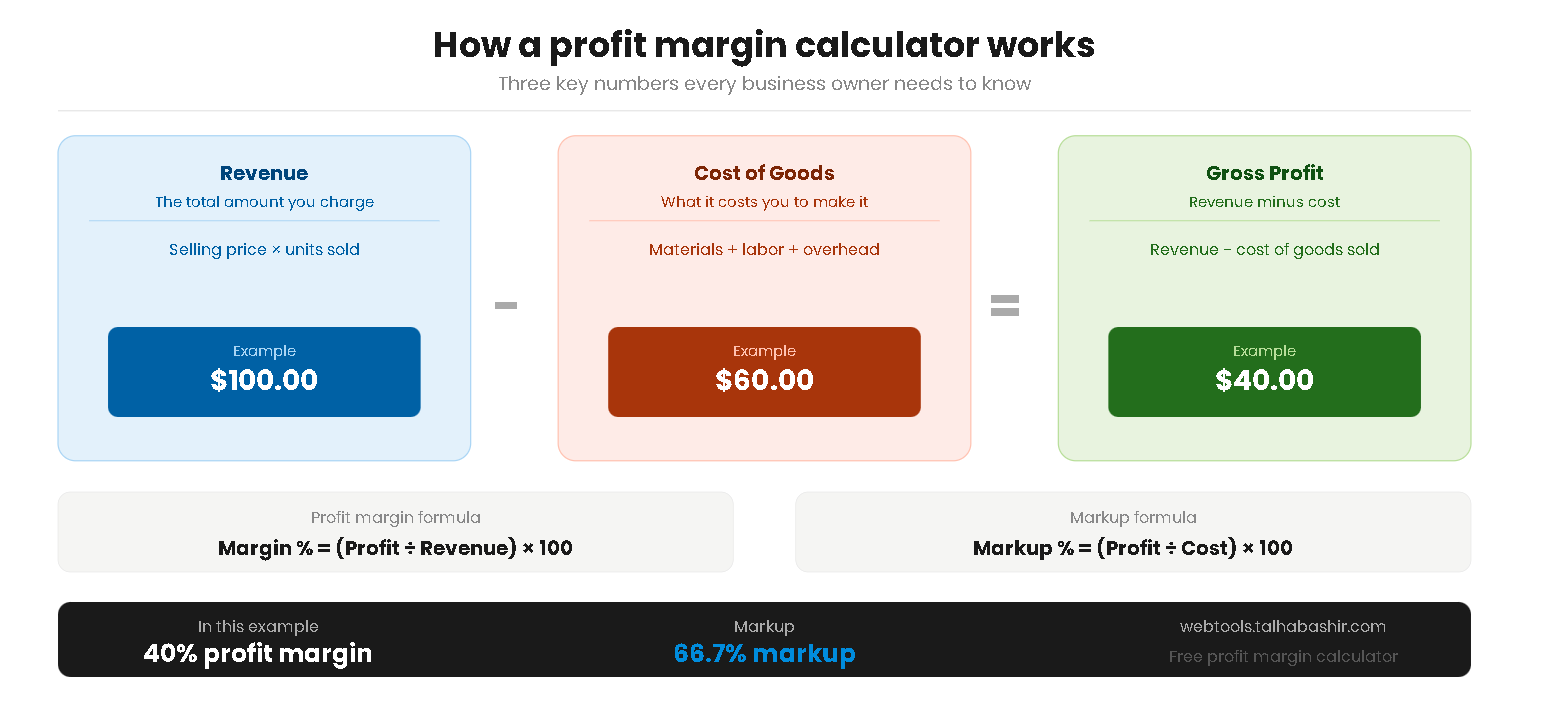
For example, a 40% profit margin means that for every $100 you bring in, $40 is profit and $60 goes toward costs. Therefore, the higher your margin, the more efficiently your business converts revenue into profit.
Gross vs net profit margin
There are two main types of profit margin you should understand:
- Gross profit margin — this is what our profit margin calculator measures. It shows profit after subtracting the direct cost of goods sold (COGS), before operating expenses like rent, salaries, and marketing.
- Net profit margin — this is profit after ALL expenses including taxes, interest, and overheads. As a result, net margin is always lower than gross margin and gives a fuller picture of business health.
For product-based businesses and e-commerce stores, gross profit margin is the most useful day-to-day metric for pricing decisions.
Profit margin calculator formula
Our profit margin calculator uses two standard formulas that every business owner and accountant relies on. Specifically, margin and markup measure the same profit from two different angles:
Profit margin formula
Margin is expressed as a percentage of the selling price. For instance, on a $100 product that costs $60 to make, the margin is 40%.
Markup formula
Markup, on the other hand, is expressed as a percentage of the cost price. On the same product, the markup would be 66.7%. Consequently, markup is always a higher percentage than margin for the same product — which is a common source of confusion.
Example profit margin calculation
To illustrate how our profit margin calculator works, here is a practical example. Suppose you sell a product for $100 that costs you $60 to produce, and you sell 500 units per month:
As this example shows, a 40% margin on a product sounds solid — but the real power of the profit margin calculator is seeing how those percentages translate into actual dollar profit at scale.
What is a good profit margin?
A "good" profit margin depends heavily on your industry. Furthermore, what is considered healthy in e-commerce may be razor-thin in grocery retail. As a general benchmark, a gross profit margin above 50% is considered strong for most product-based businesses.
Profit margin benchmarks by industry
E-commerce & Retail
Services & Digital
Physical Products
Rule of thumb — if your gross profit margin is below 20%, review your pricing or reduce your cost of goods. Most sustainable businesses target at least 30% gross margin.
Tips to improve your profit margin
If your profit margin calculator result is lower than you would like, there are two main levers you can pull — increase your revenue or reduce your costs. Here are the most effective strategies:
Increase your selling price
- Test price increases gradually — even a 5–10% price increase on a product with strong demand can significantly improve your margin without hurting volume.
- Add value to justify higher prices — better packaging, faster delivery, or a stronger brand story can support premium pricing.
- Bundle products — selling items together at a slight premium increases average order value and overall margin.
Reduce your cost of goods
- Negotiate with suppliers — as your order volume grows, you have more leverage to negotiate better unit costs. Even a 5% reduction in COGS has a direct impact on your margin.
- Reduce packaging and shipping costs — these are often overlooked components of COGS that erode margin significantly at scale.
- Eliminate low-margin products — use our profit margin calculator to identify which products are dragging down your overall margin and consider discontinuing or repricing them.
Learn more from trusted business resources:
Investopedia — Profit Margin Explained SBA.gov — Managing Business Finances