
Hashtag Generator by Niche
Use our free hashtag generator to get targeted, niche-specific hashtags for Instagram, TikTok, and LinkedIn instantly. Pick your niche, select your platform, and get a ready-to-copy set of small, medium, and large hashtags. No sign-up required.
How to use this hashtag generator
Getting your niche-specific hashtags takes under 30 seconds. Our free hashtag generator produces a balanced mix of small, medium, and large hashtags tailored to your niche, platform, and account size — so you always have the right tags ready to copy and paste.
Select your niche from the dropdown — fitness, food, business, travel, and 14 more categories.
Select your account size so the generator tailors tag competitiveness to your reach level.
Choose your platform — Instagram, TikTok, or LinkedIn — for platform-optimized tag counts.
Click Generate, then copy all hashtags or copy them formatted for your caption.
Why hashtag strategy matters for social media growth
Hashtags are one of the most powerful organic discovery tools on Instagram, TikTok, and LinkedIn. When used correctly, they expose your content to users who are not yet following you — effectively acting as a free distribution channel. However, most creators use hashtags incorrectly, which limits their reach rather than expanding it.
The key mistake most accounts make is using only the largest, most popular hashtags — like #fitness with over 500 million posts. At that scale, your content is buried within seconds of posting. Instead, our hashtag generator builds a tiered mix of small niche tags, medium-competition tags, and a few broad tags, which gives your content the best chance of being discovered across multiple audience segments simultaneously.
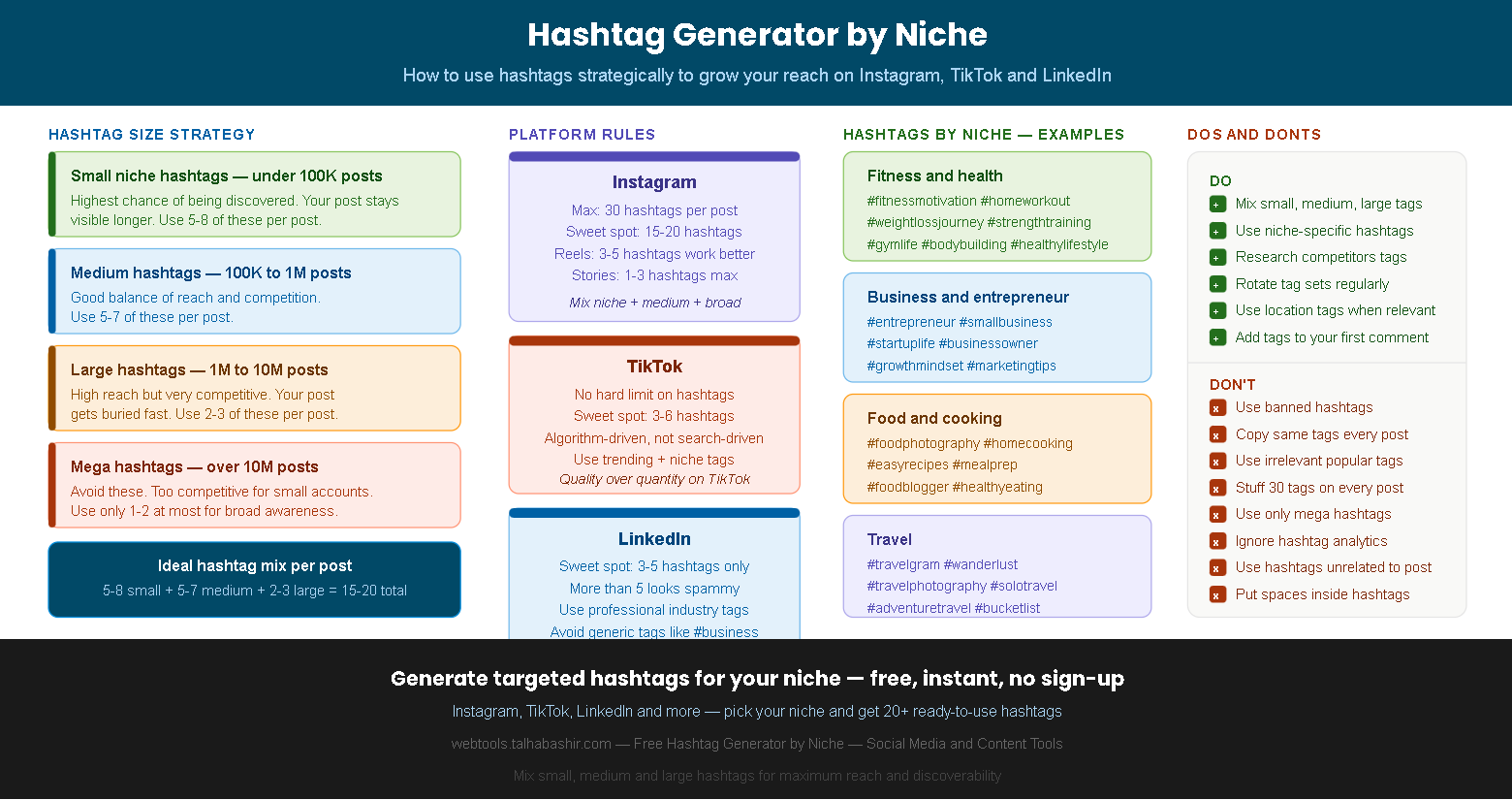
The four hashtag size tiers
Small niche hashtags
Your post stays visible for days or weeks. Highest chance of ranking in the top posts. Essential for small and mid-size accounts. Use 5–8 per post.
Medium hashtags
Good balance of reach and competition. Still winnable for accounts under 100K followers. Provides solid discovery volume. Use 5–7 per post.
Large hashtags
High volume but very competitive. Your post disappears quickly unless you have strong early engagement. Use sparingly — 2–3 per post at most.
Mega hashtags
Avoid for most accounts. Dominated by major brands and creators. Only useful for viral content or accounts with 100K+ engaged followers. 1–2 max.
The ideal hashtag mix: 5–8 small niche tags + 5–7 medium tags + 2–3 large tags = 15–20 total. This combination maximizes discoverability across all competition levels simultaneously.
Hashtag strategy by platform
Each social media platform treats hashtags differently. Our hashtag generator automatically adjusts the number and type of tags based on your selected platform — because what works on Instagram can actually hurt your performance on LinkedIn or TikTok.
Instagram hashtags
Instagram supports up to 30 hashtags per post, but the sweet spot is 15–20. For Reels, 3–5 hashtags tend to perform better than the maximum. Mix niche, medium, and broad tags. You can place hashtags in the caption or the first comment — both work equally well for reach. Avoid using the same set of hashtags on every post, as Instagram's algorithm may reduce your reach if it detects repetitive tag usage.
TikTok hashtags
TikTok's algorithm is primarily interest-based rather than hashtag-based, which means hashtags play a smaller role than on Instagram. The sweet spot is 3–6 highly relevant hashtags. Include at least one trending hashtag when relevant, one niche-specific tag, and one broad category tag. TikTok also gives extra weight to hashtags that match your video's text content and audio, so align your tags with your spoken and on-screen words.
LinkedIn hashtags
LinkedIn is the most conservative platform for hashtags — 3 to 5 is the widely recommended maximum. More than 5 hashtags on LinkedIn looks spammy and can reduce post reach. Use highly specific professional and industry hashtags rather than generic ones. For example, #contentmarketing outperforms #marketing, and #ecommercetips outperforms #business. Place hashtags at the end of your post, not embedded within the body text.
Never use banned hashtags — Instagram will suppress your entire post's reach, not just the banned tag. Always check a hashtag before adding it to your regular rotation by searching it on the app and looking for a "hidden posts" message.
Official platform resources:
Instagram Creators — Official guide to using hashtags TikTok Newsroom — Creator tips and platform updates