Invoice Generator | Free Professional Invoice Maker
Free Online Tool

Invoice Generator

Use our free invoice generator to create professional invoices in seconds. Fill in your details, add line items, and download your invoice as a PDF — completely free with no account required.

FreeAlways free to use
PDF ReadyDownload instantly
ProfessionalClean design
No sign-upNo account needed
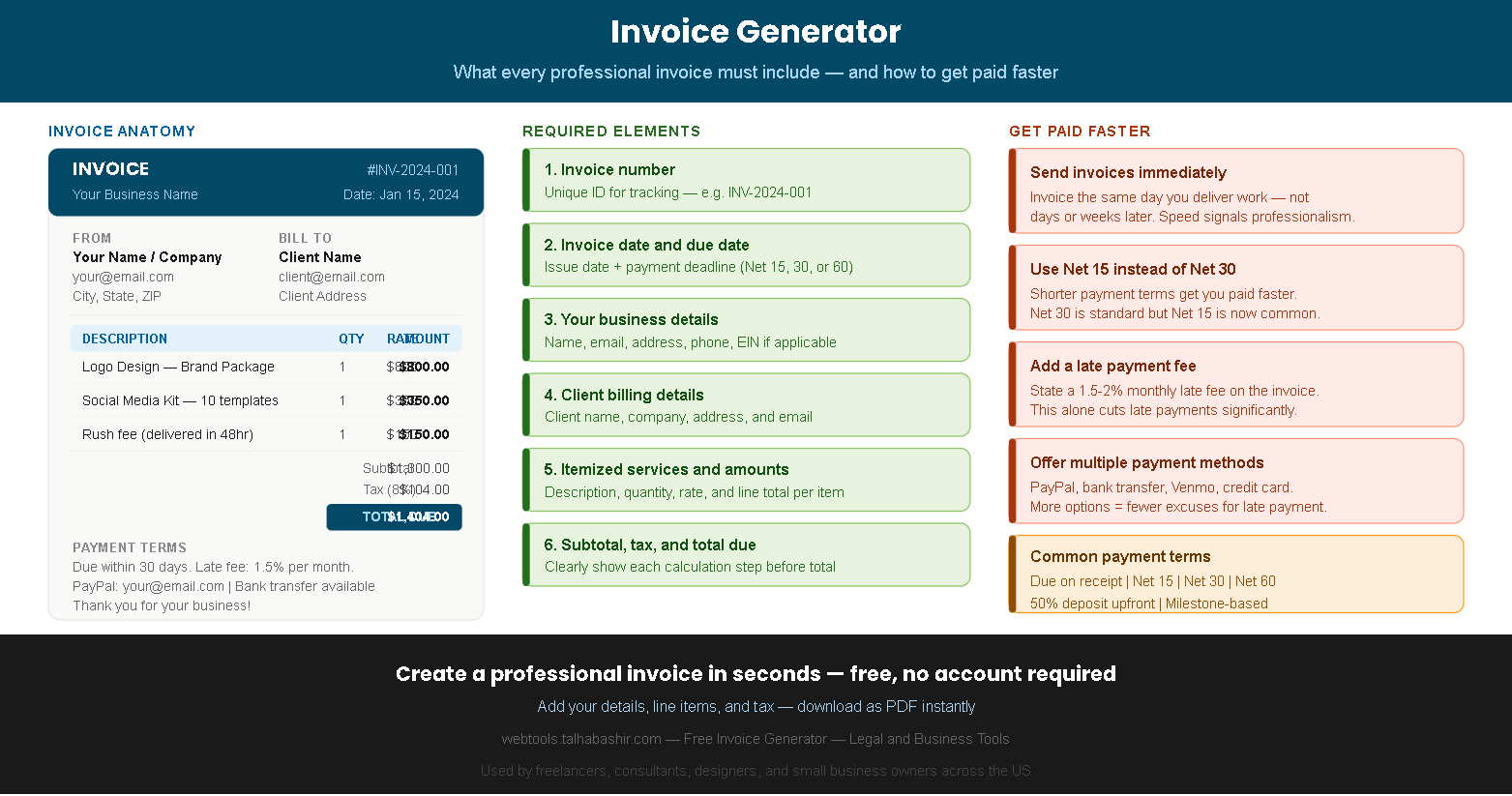
Invoice generator infographic showing what to include in a professional invoice
Create your invoice
Your business details
Client billing details
Invoice details
Services and line items
DescriptionQtyRate
Tax and additional details
INVOICE #INV-001
Issue date: —  |  Due: —
From
Your Business Name
your@email.com
Bill To
Client Name
client@email.com
Description Qty Rate Amount
Add line items in the form to see them here
Subtotal$0.00
Total Due$0.00

How to use this free invoice generator

Creating a professional invoice with our free invoice generator takes under two minutes. Fill in your details on the left, watch the live preview update on the right, and download your finished invoice as a PDF with one click — no account, no watermark, no cost.

1

Enter your business details and your client's billing information in the form.

2

Add your services as line items with a description, quantity, and rate per item.

3

Set your tax rate, discount, payment terms, and any notes or late fee language.

4

Click Download as PDF to save your professional invoice and send it to your client.

Why professional invoices matter for freelancers and small businesses

A professional invoice is more than a payment request — it is a legal document that records the agreement between you and your client, protects you in disputes, and signals that you operate a legitimate, trustworthy business. Clients are statistically more likely to pay on time when they receive a clean, clearly formatted invoice compared to a casual email or informal payment request.

Furthermore, proper invoices are essential for tax compliance. The IRS requires self-employed individuals and business owners to maintain records of all income, and a well-structured invoice serves as that record. Our free invoice generator creates invoices that include all the fields required for proper business record-keeping.

Tips to get paid faster

Timing

Invoice immediately after delivery

Send your invoice the same day you deliver work — not days or weeks later. Immediate invoicing signals professionalism and keeps the project fresh in your client's mind, which significantly reduces payment delays.

Terms

Use Net 15 instead of Net 30

Net 30 is traditional but Net 15 is now widely accepted and gets you paid twice as fast. Many clients pay by the stated deadline — so setting a shorter deadline directly reduces your average payment time.

Late fees

State a late payment fee

Including a 1.5–2% monthly late fee in your invoice terms dramatically reduces late payments. Most clients will pay on time specifically to avoid the fee — even if you would never actually charge it.

Payment options

Offer multiple payment methods

List every payment method you accept — PayPal, bank transfer, Venmo, Zelle, credit card. More options eliminate the excuse of "I didn't know how to pay you" and reduce friction at the payment stage.

Deposit

Require a 50% upfront deposit

For new clients or large projects, requiring 50% upfront protects you from non-payment and establishes a professional boundary. Invoice for the deposit before starting work and the remainder upon delivery.

Follow up

Follow up before the due date

Send a friendly reminder 3–5 days before the invoice due date. A simple "just a reminder that invoice #001 is due on Friday" email prevents most late payments without damaging the client relationship.

Pro tip — always include your invoice number in every email and follow-up communication. A clear invoice number makes it easy for your client's accounts payable team to process and match your payment quickly.

Never send an invoice without a due date. "Due when you get a chance" is not a payment term. Always specify an exact due date — Net 15 or Net 30 from the invoice date — so there is no ambiguity about when payment is expected.

Frequently asked questions about invoices

Is this invoice generator completely free?+
Yes — our invoice generator is 100% free with no hidden fees, no watermarks, and no account required. You can create and download as many invoices as you need at no cost. The PDF is clean and professional with no WebTools branding on the invoice itself, making it suitable for sending directly to clients.
What information must a legal invoice include?+
A legally valid invoice in the US should include your name and contact information, your client's name and address, a unique invoice number, the issue date and payment due date, an itemized list of services or products with quantities and rates, the subtotal, any applicable taxes, and the total amount due. For businesses registered as an LLC or corporation, including your EIN (Employer Identification Number) is also recommended. Our invoice generator includes fields for all of these required elements.
What does Net 30 mean on an invoice?+
Net 30 means the client has 30 days from the invoice date to submit payment. It is one of the most common payment terms in the US. Similarly, Net 15 gives the client 15 days, and Net 60 gives 60 days. "Due on receipt" means payment is expected immediately upon receiving the invoice. For freelancers and small businesses, Net 15 or Net 30 is the most practical choice. Avoid Net 60 unless your client specifically requires it, as it significantly delays your cash flow.
Should I charge sales tax on my invoices?+
Whether you need to charge sales tax depends on your state, your type of business, and the nature of your services. In most US states, services are not subject to sales tax — but products and some digital services are. However, several states do tax certain professional services. If you are unsure whether your services are taxable in your state, consult a CPA or check your state's department of revenue website. Our invoice generator includes a tax rate field that you can leave at 0% if sales tax does not apply to your work.
How do I number my invoices?+
Invoice numbers should be unique and sequential so you can track payments and reference specific invoices in communications. A common format is INV-YEAR-NUMBER — for example, INV-2024-001, INV-2024-002, and so on. Some freelancers include the client name abbreviation — for example, INV-ACME-001 — which makes it easier to track invoices by client. The most important rule is consistency. Whatever system you choose, apply it to every invoice so your records stay organized and auditable.
What should I do if a client does not pay their invoice?+
If a client misses the payment due date, send a polite follow-up email referencing the invoice number and the overdue amount within 1–2 days of the missed deadline. If there is no response within a week, send a firmer reminder that references your late payment fee. For invoices that are 30+ days overdue, consider sending a formal demand letter via certified mail. For larger amounts, small claims court is an option for amounts under your state's limit (typically $5,000–$10,000). For very large unpaid invoices, consulting a collections attorney may be warranted. Always keep copies of your invoice and all communications as documentation.
This invoice generator creates invoices for informational and business use. The generated invoices are not legal documents and should not replace advice from a qualified accountant or attorney. Tax rates, legal requirements, and invoice regulations vary by state and business type. Always consult a licensed CPA or business attorney for advice specific to your situation.
Scroll to Top