
Free Image Converter 2026 — JPG, PNG, WebP and More
Use our free image converter to convert images between JPG, PNG, WebP, GIF, and BMP in 2026 — instantly and privately, with no file uploads to any server. All conversion happens in your browser. Your images are never uploaded to any server. No sign-up required.
How to use this free image converter
Converting your images takes under 30 seconds. Our free image converter processes everything directly in your browser using the Canvas API — your files are never sent to any server, giving you 100% privacy and instant results with no file size limits imposed by server quotas.
Drop your images onto the tool or click Select Images to choose files in any supported format.
Select your target format — JPG, PNG, WebP, GIF, or BMP — using the format buttons.
Click Convert Images and see each image instantly converted in your browser.
Click Download on each image or Download All to save every converted file at once.
Why convert between image formats in 2026?
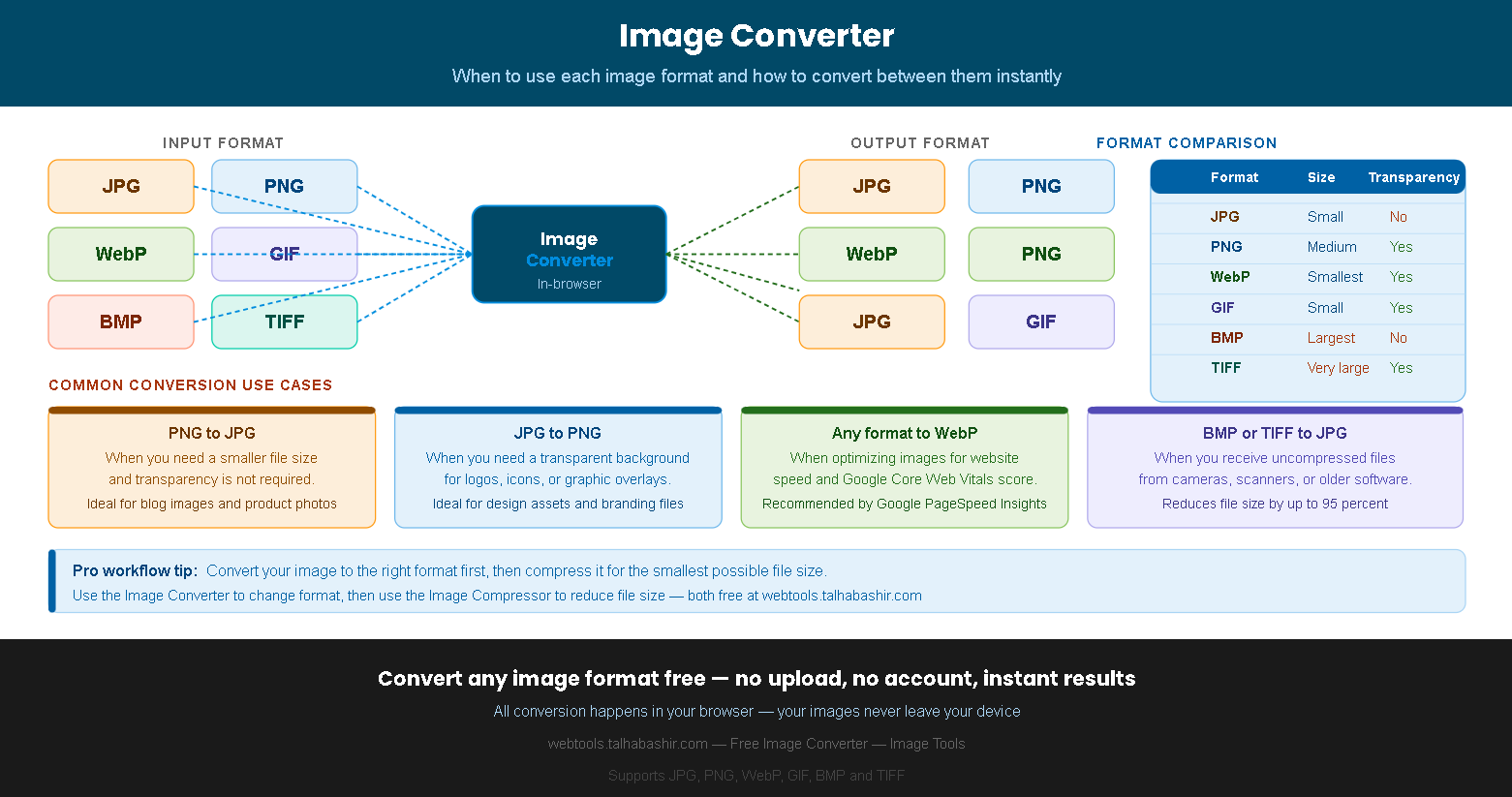
Different image formats were designed for different purposes, and using the wrong format can cost you in file size, compatibility, or visual quality. Our image converter makes it easy to switch between formats in seconds — whether you need a transparent background, a smaller file, or a format compatible with a specific platform or tool.
Additionally, Google's PageSpeed Insights actively recommends serving images in next-generation formats — specifically WebP — for better Core Web Vitals scores. Converting your existing JPG and PNG images to WebP can reduce file sizes by 25–35% with no visible quality difference, which directly improves your website's loading speed and search ranking.
Common image conversion use cases
Reduce file size for photos
PNG uses lossless compression, which makes files significantly larger than JPG for photographic content. Converting a photo from PNG to JPG can reduce file size by 60–80% with no perceptible quality difference for most web images. Use this conversion for blog post images, product photos, and any photographic content where transparency is not needed.
Add transparency support
JPG does not support transparent backgrounds, which makes it unsuitable for logos, icons, and design assets that need to sit on top of other elements. Converting from JPG to PNG gives you full transparency support, which is essential for branding materials, website overlays, and any graphic that needs a clear background for placement on different colored surfaces.
Optimize for web performance
WebP is Google's modern image format that offers better compression than both JPG and PNG while supporting transparency. Converting your images to WebP before uploading to your website can reduce page weight significantly, improving load times and Core Web Vitals scores. All modern browsers including Chrome, Firefox, Safari, and Edge support WebP natively.
Convert uncompressed files
BMP and TIFF files are uncompressed or minimally compressed formats commonly produced by scanners, medical equipment, and older software. A single BMP or TIFF file can be 10–50 MB, making them impractical for sharing or web use. Converting to JPG typically reduces these files by 90–95% while maintaining excellent visual quality for standard viewing purposes.
Speed up your website
If your website already uses JPG images, converting them to WebP is one of the highest-impact performance improvements you can make. WebP files are typically 25–35% smaller than equivalent JPG files at the same visual quality. Google PageSpeed Insights specifically flags JPG images as a performance opportunity and recommends switching to WebP format for web delivery.
Smaller files with transparency
One of WebP's key advantages over both JPG and PNG is that it supports transparency like PNG but produces files that are typically 26% smaller than equivalent PNG files. This makes PNG to WebP conversion ideal for logos, icons, and design assets where you need both transparency and the smallest possible file size for fast web delivery.
Image format guide 2026 — JPG vs PNG vs WebP explained
Understanding the differences between image formats helps you choose the right output format in our image converter. Each format has specific strengths that make it ideal for certain types of content and use cases.
| Format | Compression | Transparency | Best use case | Typical size |
|---|---|---|---|---|
| JPG | Lossy | No | Photos, blog images, product photos | Small |
| PNG | Lossless | Yes | Logos, icons, screenshots, graphics with text | Medium–Large |
| WebP | Both | Yes | All web images — best overall web format | Smallest |
| GIF | Lossless | Yes (1-bit) | Animated images, simple graphics | Small–Medium |
| BMP | None | No | Windows system graphics, raw editing | Very large |
| TIFF | Lossless | Yes | Print, photography archiving, scanning | Very large |
Pro workflow: convert your image to the right format first using this tool, then compress it with our Image Compressor for the smallest possible file size before uploading to your website.
Converting from a lossy format (JPG) to a lossless format (PNG) does not recover lost quality — it only increases the file size. Always start from the original high-resolution source file when converting for best results.
Official resources on image formats:
Google Developers — WebP image format overview Web.dev — Serve images in modern formats