
YouTube Title and Description Optimizer 2026
Use our free YouTube title and description optimizer to score your video title and description in 2026, preview exactly how they appear in search results, and get a personalized checklist of SEO improvements — no sign-up required.
How to use this YouTube title and description optimizer
Getting your optimization score takes under a minute. Enter your video title, focus keyword, and description, and our YouTube title and description optimizer will instantly score each element and give you a personalized checklist of improvements to make before you publish.
Enter your video title — the exact title you plan to use or want to test.
Enter your focus keyword — the main search term you want your video to rank for.
Paste your video description and select your niche and target audience.
Click Analyze to get your scores, a SERP preview, and a step-by-step improvement checklist.
What is YouTube SEO and why does title optimization matter in 2026?
YouTube is the world's second-largest search engine, processing over 3 billion searches every month. Just like Google, YouTube uses an algorithm to decide which videos to surface when someone searches for a topic. Your video title and description are two of the most important signals that algorithm uses to understand what your video is about and who it should be shown to.
YouTube title and description optimization is the process of crafting those two elements — your title and description — to maximize both your search ranking and your click-through rate. A well-optimized title ranks higher in YouTube search results and compels more viewers to click. A well-optimized description provides the algorithm with rich context, helps your video appear in suggested content, and converts viewers into subscribers.
Why your title is the most important factor
Your YouTube title does two things simultaneously — it tells the algorithm what your video is about, and it tells the human viewer why they should click. Therefore, an optimized title must balance keyword placement for SEO with emotional language that drives clicks. Research consistently shows that titles between 60 and 70 characters perform best, since they display fully in search results without truncation on most devices.
Why your description is equally critical
Many creators treat the video description as an afterthought. However, YouTube's algorithm reads the full description and uses it to determine relevance for search queries that are not directly in your title. A description of 200 words or more — with your keyword in the first two sentences and a clear call to action — significantly improves both your search visibility and your subscriber conversion rate. Furthermore, descriptions with timestamps, relevant links, and hashtags consistently outperform bare-minimum descriptions.
How to optimize your YouTube title for more views in 2026
Our YouTube title and description optimizer evaluates six critical factors across your title and description. Each factor has a measurable impact on your video's performance in search and suggested content.
Title length (60–70 characters)
Titles under 60 characters leave ranking opportunity on the table. Titles over 100 characters get cut off in search results, hurting click-through rates on mobile and desktop.
Keyword in title (first 60 chars)
YouTube's algorithm weights keywords that appear early in the title more heavily. Placing your focus keyword within the first 60 characters of the title is the single most impactful SEO action.
Power words and emotional triggers
Titles containing words like "how to," "best," "step by step," "free," "fast," or specific numbers (e.g., "7 ways") consistently generate higher click-through rates than neutral titles.
Keyword in first 150 characters of description
Only the first 150 characters of your description appear in YouTube search results before the "Show more" cutoff. Placing your keyword here maximizes its SEO impact.
Description length (200+ words)
Longer descriptions give YouTube's algorithm more context to work with. Videos with descriptions of 200 words or more consistently rank for more secondary keywords than those with minimal descriptions.
Call to action in description
A clear call to action — such as asking viewers to subscribe, comment, or visit a link — increases engagement signals that YouTube's algorithm uses to determine whether to promote your video further.
Description Score = keyword in first 150 chars + length + CTA + timestamps
Overall = (Title Score + Description Score + Keyword Score) / 3
The single most impactful change most creators can make: put the exact focus keyword in the first 5 words of the title. This one change can increase search ranking significantly with no other edits.
YouTube title and description best practices 2026
Beyond the technical SEO factors our YouTube title and description optimizer checks, there are several creative strategies that top YouTube creators use to consistently outperform competitors in both search rankings and click-through rates.
Title writing best practices
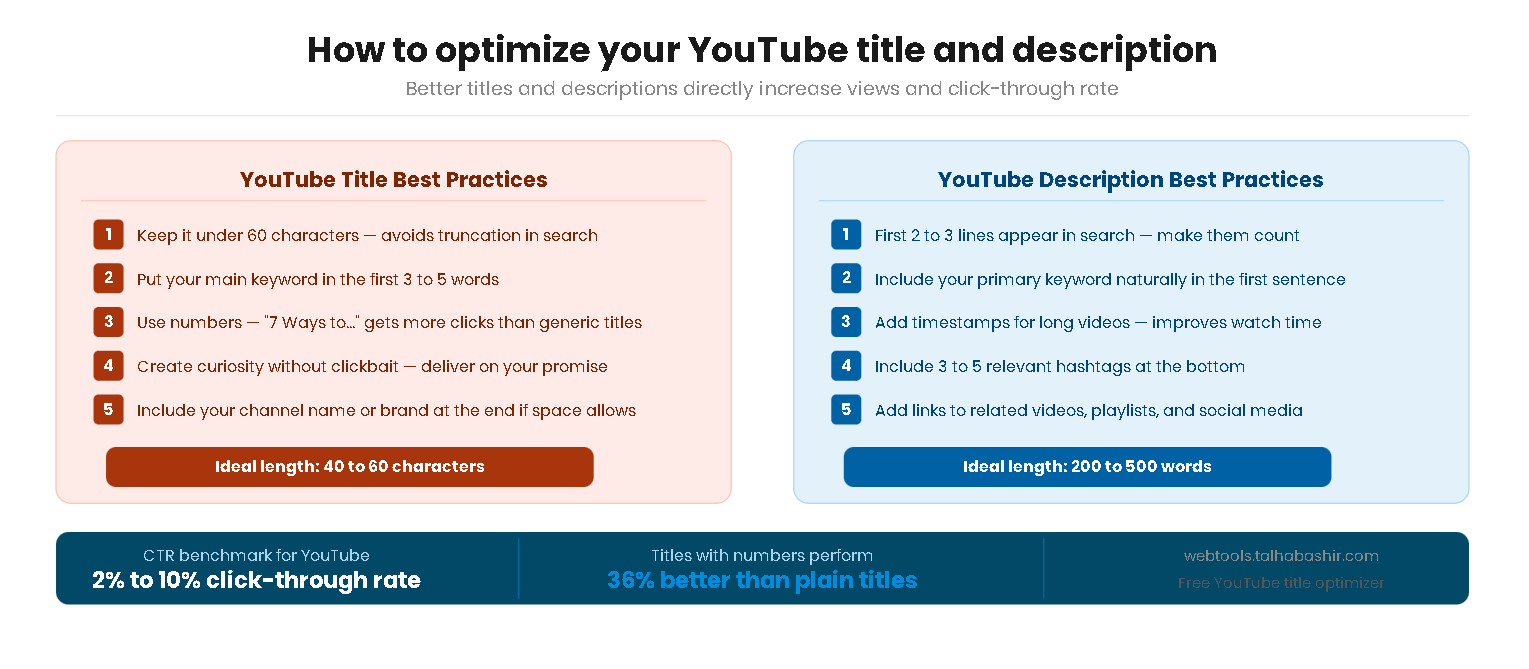
- Lead with the keyword — start your title with or near your focus keyword so both the algorithm and the viewer see it immediately.
- Use numbers when relevant — "5 Ways to..." or "Make $1,000 in..." consistently outperform vague titles because they set specific expectations.
- Create a curiosity gap — titles that hint at a surprising result or answer drive more clicks than titles that give everything away up front.
- Avoid clickbait — titles that overpromise and underdeliver cause viewers to click away quickly, which hurts your watch time and algorithm performance.
- Test with A/B tools — YouTube Studio allows you to see how different thumbnails and titles perform. Treat your title as a hypothesis, not a final decision.
Description writing best practices
- Write a proper first sentence — treat the first 150 characters like a meta description. Include your keyword and clearly state what the video covers.
- Add timestamps — timestamped chapters appear in Google Search results as well as YouTube, dramatically increasing discoverability beyond the platform.
- Include 3–5 relevant hashtags — add hashtags at the end of the description to help YouTube categorize your video for suggested content.
- Link to related videos — linking to your other videos in the description keeps viewers on your channel and signals to YouTube that your content is interconnected.
- End with a clear CTA — always tell viewers what to do next: subscribe, comment with a question, or visit a linked resource.
Avoid keyword stuffing in your description. Repeating your keyword 10+ times does not help — YouTube's algorithm detects unnatural repetition and may reduce your video's distribution as a result.
Learn more from official sources:
YouTube Help — Add a title, description and tags to your video YouTube Creator Academy — Official creator training resources